
今回は、Springbootでエラーページを表示する方法についてみていきたいと思います。
サンプルで使用する技術
- Java
- Springboot
- Thymeleaf
注意事項
- src/main/resources/templates/errorディレクトリを作成します。
- errorディレクトリ配下に「 {状態コード}.html」のように作成します。
- 上記のようにするとSpringbootでマッピングして表示してくれます。
- サンプルでは「404」エラーのみ作成します。
- サンプルコードはプライベートプロジェクトで使っていた内容なので、そのままコピーすると動かないです。流れだけ見ていただければと思います。
サンプル
エラーページ作成
<!DOCTYPE html>
<html xmlns:th="http://www.thymeleaf.org">

<head>
  <meta charset="UTF-8">
  <meta name="viewport" content="width=device-width, initial-scale=1.0">
  <title>error 404</title>
  <link href="https://fonts.googleapis.com/css2?family=Nunito:wght@300;400;600;700;800&display=swap" rel="stylesheet">
  <link rel="stylesheet" th:href="@{/css/bootstrap.css}">
  <link rel="stylesheet" th:href="@{/vendors/bootstrap-icons/bootstrap-icons.css}">
  <link rel="stylesheet" th:href="@{/css/app.css}">
  <link rel="stylesheet" th:href="@{/css/pages/error.css}">
</head>

<body>
<div id="error">


  <div class="error-page container">
    <div class="col-md-8 col-12 offset-md-2">
      <img class="img-error" th:src="@{/images/samples/error-404.png}" alt="Not Found">
      <div class="text-center">
        <h1 class="error-title">NOT FOUND</h1>
        <p class='fs-5 text-gray-600'>The page you are looking not found.</p>
        <a href="index.html" class="btn btn-lg btn-outline-primary mt-3">Go Home</a>
      </div>
    </div>
  </div>


</div>
</body>

</html>
- src/main/resources/templates/error/404.html
実行
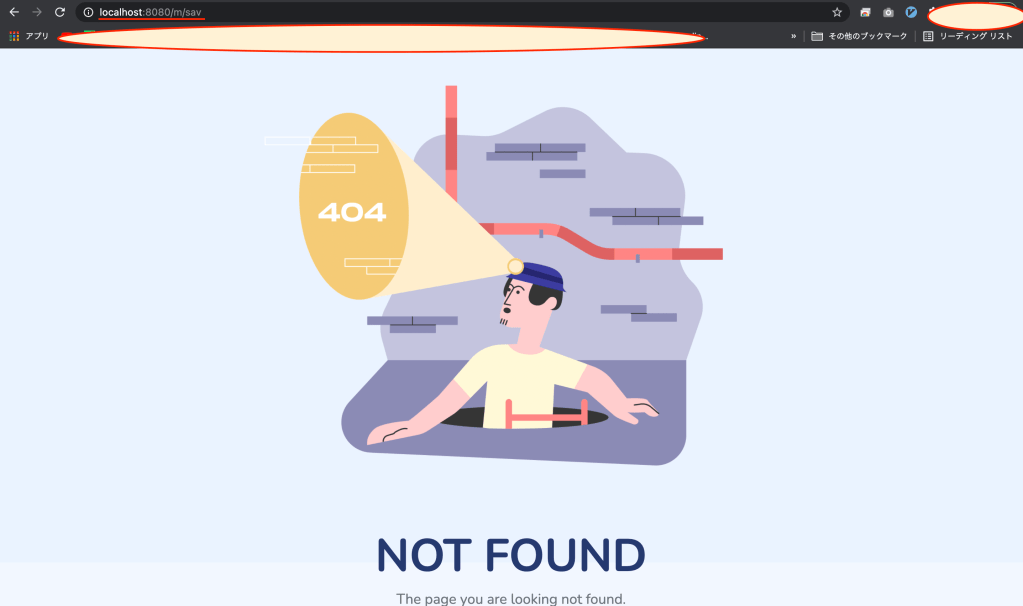
- 「http://localhost:8080/m/sav」のように存在しないURIを入力してリクエストをすると正常にエラーページに遷移されることが確認できます。
終わりに
403エラー、500エラーなども上記のサンプルのように作成してハンドリングできます。
色々エラーページにカスタム内容を表示することもできますが、最近はイメージだけ表示されるサイトも多いので、今回はイメージだけ貼りました。
 諦めなければできる - Anveloper